
Umbraco 13 reaches end of life on 14 December 2026, and after that date Umbraco HQ stops shipping security patches for it. You can buy Extended Long-Term Support (XLTS) to buy time, upgrade in place to Umbraco 17, rebuild on Umbraco 17, or move the site to a different stack. Doing nothing is also a choice. For a public website, it's not one we'd recommend.
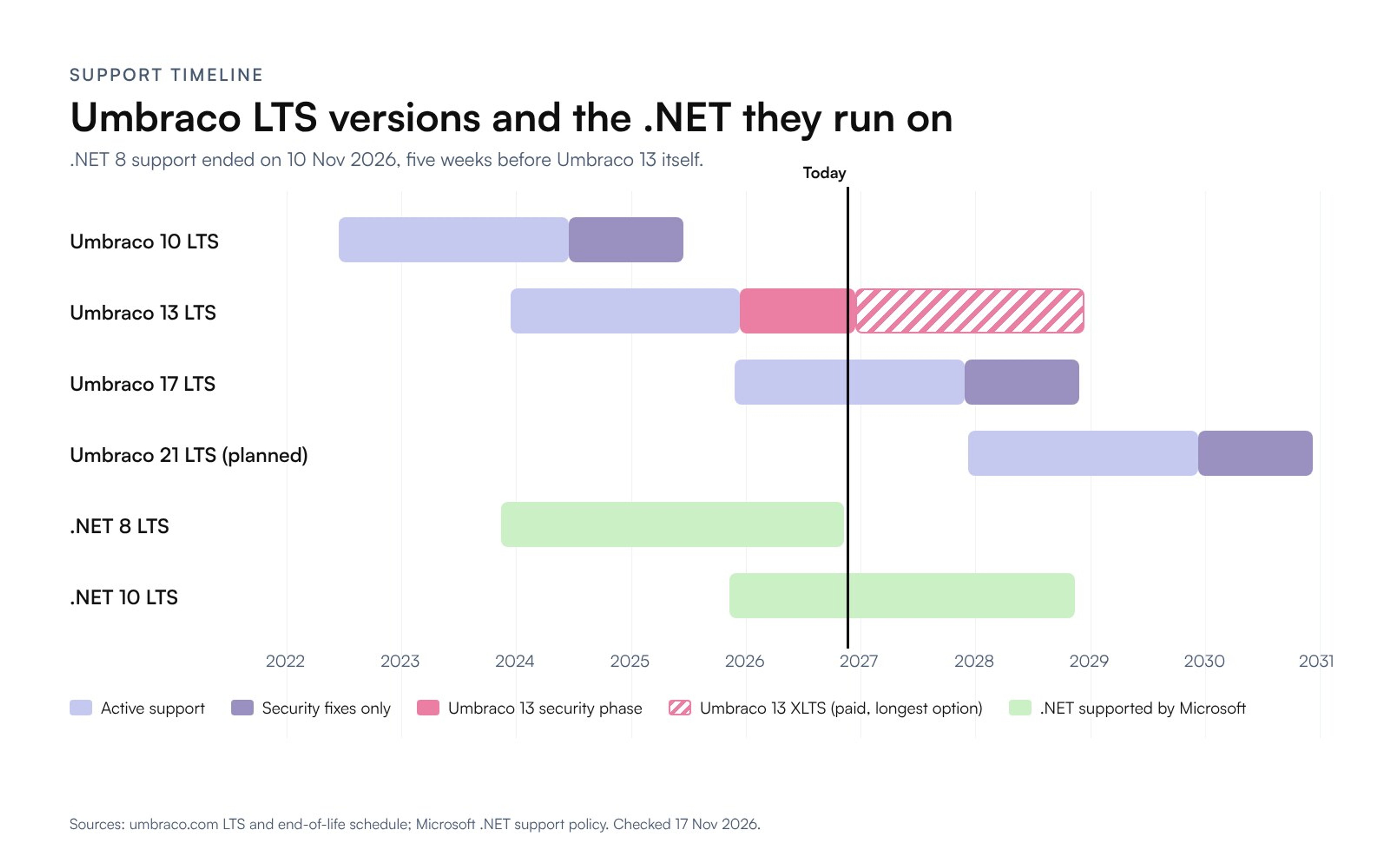
There's a second date, and it has already passed. Umbraco 13 is built on .NET 8, and Microsoft's support for .NET 8 ended on 10 November 2026. If your site is still on version 13 today, the runtime underneath it is already out of support.
A word on where we stand. At Celerart we build and migrate marketing sites, and our own Umbraco page is about moving off Umbraco. So this guide sticks to what Umbraco, Microsoft and developers on the Umbraco forum have published, and puts it in one place so you can make the call. For plenty of teams, staying on Umbraco is the right answer, and I'll say when.
What are your options for Umbraco 13 end of life?
The short version is below. Each row gets its own section further down, with links to the sources.
| Option | Supported until | Effort | Suits you when | Watch out for |
|---|---|---|---|---|
| Stay on 13, unpatched | Security fixes end 14 Dec 2026 (.NET 8 ended 10 Nov 2026) | None | Not recommended for a public site | Vulnerabilities found after December stay open |
| Buy XLTS for 13 | 6, 12 or 24 months after EOL (roughly June 2027, December 2027 or December 2028) | Low: patches come from a private NuGet feed | You have a plan, just not enough time to do it before December | Price not published, frozen feature set, the XLTS page says nothing about .NET 8 |
| Upgrade in place to 17 LTS | Active support to 27 Nov 2027, security fixes to 27 Nov 2028 (.NET 10 to 14 Nov 2028) | Depends on custom backoffice code and legacy editors | The site is in good shape and your team is invested in .NET | New backoffice: AngularJS extensions must be rewritten; legacy editors need converting first |
| Rebuild on Umbraco 17 | Same as above | A new project | You want to stay on Umbraco but the current build is a tangle | You still face the next LTS move before November 2028 |
| Replatform (for example Astro or Next.js with Sanity or Payload) | Not tied to Umbraco's cycle | A new project | Marketing owns the site and nobody wants to run .NET for it | Members, complex forms and deep .NET integrations need their own plan |
What happens when Umbraco 13 reaches end of life?
Your site won't switch off. Umbraco's end-of-life page is clear about that: projects "will technically continue to function" after end of life. Pages keep loading, editors can still log in and forms still send.
What stops is the safety net. From 14 December, Umbraco HQ no longer provides security patches for version 13, and official technical support ends. Umbraco Cloud projects follow the same date, so their automatic security patches stop too.
"We do not recommend using Umbraco 13 after it enters EOL." (Umbraco HQ, Umbraco 13 end-of-life page)
Version 13 has actually been in its final phase for a year, according to Umbraco's LTS and end-of-life schedule. It was released on 14 December 2023 as a Long-Term Support (LTS) version, with two years of active support, then a twelve-month security phase that began on 14 December 2025, in which only security issues get fixed. End of life is the end of that security phase.
If you are on an older version, you are already past this point. Umbraco 8 reached end of life on 24 February 2025, Umbraco 10 (the LTS before 13) on 16 June 2025, and the short-term releases 9, 11 and 12 ended earlier still. The options below still apply. The gap to a supported version is just wider.
Is .NET 8 already out of support?
Yes. Umbraco's requirements page for version 13 says it plainly: "as Umbraco version 13 is based on .NET 8 you will need to follow the .NET 8 supported versions." Microsoft's .NET support policy lists .NET 8 (and .NET 9) as out of support since 10 November 2026, five weeks before the CMS deadline.
In practice, any vulnerability found in the .NET 8 runtime or ASP.NET Core 8 from now on won't get a Microsoft patch, however up to date your Umbraco packages are. And you can't simply move 13 onto a newer .NET, because Umbraco doesn't support that. Some developers report it may run on .NET 9, but that is unsupported territory. The supported route onto .NET 10 is Umbraco 17, which shipped on 27 November 2025 with .NET 10 support.
Should you stay on Umbraco 13 for now?
This is the default when nobody decides. The site keeps working, so it's very easy to drift into.
For an internal tool behind a VPN, with no public login and no personal data, a short, documented period on an unsupported version while you plan may be acceptable, if your security owner signs it off. A public marketing site is a different story, especially one with the backoffice reachable from the internet, a members area or forms that collect personal data. Every security issue disclosed after December stays open, and regulated businesses may have to explain the choice to auditors or insurers.
If you do stay for a few weeks while you decide, lock the backoffice down (by IP allowlist or VPN), install the latest 13.x patch before the deadline, and put a date in the diary when this stops.
When is Umbraco XLTS worth buying?
XLTS (Extended Long-Term Support) is Umbraco's paid extension for LTS versions. According to the Umbraco 13 XLTS page, it comes in blocks of 6, 12 or 24 months, starting the day after end of life, and the blocks must be continuous with no gaps. Patches arrive through "a secure, private NuGet feed", the feature set is frozen, and Umbraco also lists continued coverage for regulatory and contractual obligations among the benefits.
For Umbraco Cloud projects, Umbraco's timeline says XLTS ends on 14 December 2028 at the latest, after which projects move to dedicated hosting until 14 December 2029, when hosting ends.
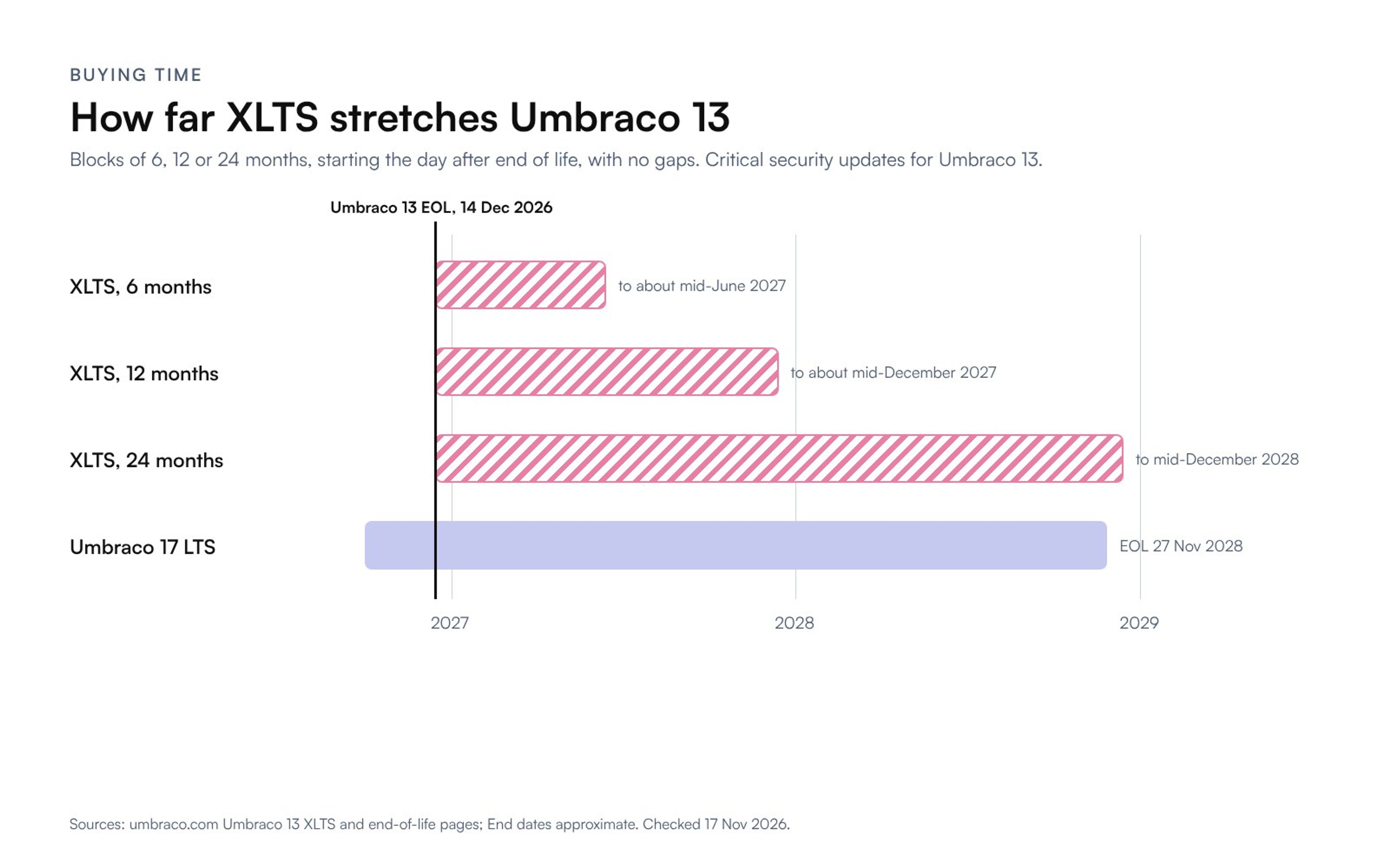
One detail on that chart is easy to miss: 24 months of XLTS runs to mid-December 2028, a couple of weeks past Umbraco 17's own end of life on 27 November 2028. Buy the longest block, upgrade at the end of it, and you land on a version that is about to retire.
XLTS is a good fit for teams that know what they want to do but can't finish it by December. As a way to put off the decision, it's a poor one. Every month on XLTS is a month on a version that is standing still, and the upgrade gap doesn't get any smaller.
Before you order, check a few things:
- The price. It isn't published: the page promises a "predictable per-period cost" and sends you to a booking form (partners go through their partner manager). [OWNER: add a real XLTS quote if a client has shared one, otherwise leave as is.]
- The runtime. The XLTS page promises critical security updates for Umbraco 13 and does not mention .NET at all. Umbraco can patch its own code, but it can't make Microsoft patch .NET 8. Ask how runtime vulnerabilities are handled, and get the answer in writing.
- The plan. Know what you're moving to before you choose between 6, 12 and 24 months.
Can you upgrade directly from Umbraco 13 to 17?
Yes, and upgrading in place is the first of the three options Umbraco recommends. Umbraco 17 is the current LTS. It runs on .NET 10, moves to its security phase on 27 November 2027, and reaches end of life on 27 November 2028. The release notes for 17.0.0 confirm the direct route: "Direct LTS-to-LTS upgrade is supported, e.g., from Umbraco 13 straight to 17 (with migrations applied automatically)."
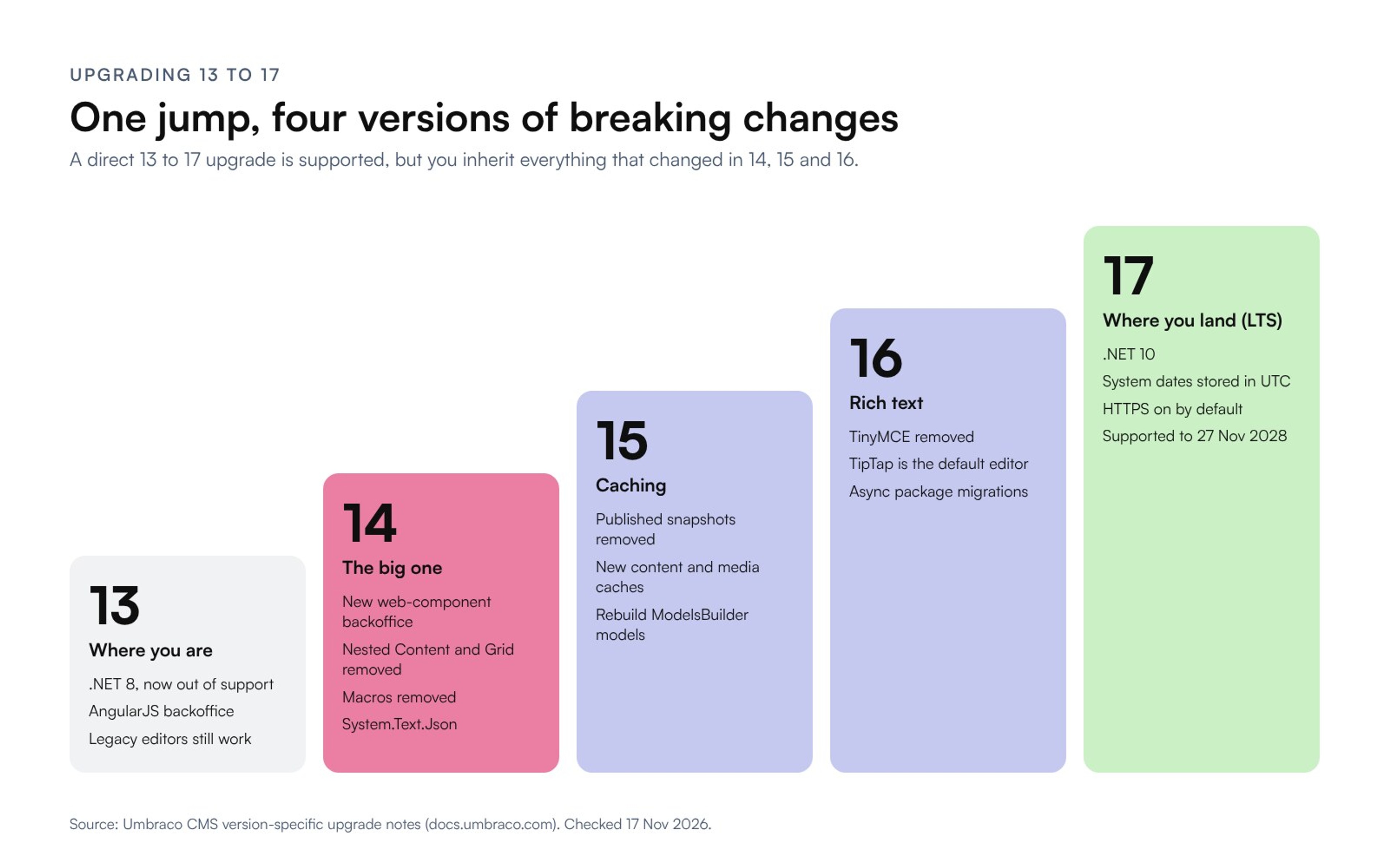
The catch: "straight from 13 to 17" still means taking on every breaking change from versions 14, 15 and 16 in one go. Those were short-term releases, and that's where most of the change happened.
What breaks between Umbraco 13 and 17?
Umbraco's version-specific upgrade notes list a lot of changes. These are the ones that turn a version bump into a project:
| Introduced in | Change | What it means for your site |
|---|---|---|
| 14 | New backoffice built with web components (Lit) replaces AngularJS | Every custom property editor, dashboard and backoffice package has to be rewritten or replaced |
| 14 | Nested Content and the Grid layout removed | Convert to Block List or Block Grid, including the stored content and the views that render it |
| 14 | Macros and partial view macros removed | Rich text that embeds macros needs blocks or partial views instead |
| 14 | Legacy media picker and XPath removed; Newtonsoft.Json replaced by System.Text.Json | Old pickers need converting; custom serialisation code may fail on stricter JSON |
| 15 | Published snapshots removed | Code using IPublishedSnapshot moves to the new content and media caches |
| 16 | TinyMCE removed, TipTap is the default rich text editor | Rich text data types migrate to TipTap unless you install a third-party TinyMCE package first |
| 17 | System dates stored in UTC; HTTPS on by default; runtime model compilation moved to a development package | Check date-sensitive code and hosting config; a migration converts existing dates |
Then there are packages. Everything you rely on, including Umbraco's own add-ons such as Forms and Deploy and community tools like uSync, needs a version that supports 17. If it doesn't have one, it has to be replaced or rewritten.
How long does an Umbraco 13 to 17 upgrade take?
It depends on what's in the site, and nobody can give you an honest number without looking at it. We found one public data point, and it's a small one. Stéphane Gay, who runs the ZpqrtBnk blog and originally wrote Umbraco's Models Builder, upgraded his own site from 13 to 17 in July 2026 and wrote up every step. His estimate:
"Total time spent is probably 1 to 2 days of work." (Stéphane Gay, ZpqrtBnk, July 2026)
That was a personal site, and it still needed a fix for a database migration that failed on a missing constraint, NGINX changes behind Docker, and a custom property editor rebuilt as a Lit component. A business site with custom backoffice extensions, legacy editors and years of content has more to get through. So the first thing to find out is how many custom extensions and legacy editors you have. [OWNER: add a typical effort range from our own audits if we have one.]
What goes wrong in real Umbraco 13 to 17 upgrades?
Release notes tell you what changed. For what actually breaks, the Umbraco forum is more useful: two long-running threads (upgrading from 13 to 17 and 13.5.2 to 17.1.0) keep circling back to the same problems.
Legacy editors left in place. The advice you'll see most often is to convert Nested Content, the old Grid and the legacy media picker while you are still on 13, using tools like uSync Migrations or Auto Block List, and only then upgrade. One developer reported uSync Migrations converted the data types but not the content, and another lost media picker data after being prompted to change the data type.
"I would ALWAYS advocate updating legacy editors first before the upgrade." (Luuk Peters, Umbraco developer, on the Umbraco forum, April 2026)
Old content versions. One developer found the Block Grid migrator in 17 failed because older content versions still held legacy Grid data; only the current and published versions had been converted. If your site keeps a long version history, plan for that, or clean it up first.
Database constraints with unexpected names. Developers upgrading long-lived databases (one started life on Umbraco 7, another went 8 to 9 to 10 to 13) hit an error like "'DF_umbracoAccess_createDate' is not a constraint" and the upgrade stopped. The constraints existed but had system-generated names. Renaming them (after a backup) fixed it, and a GitHub issue (#23702) was opened to make that migration less fragile. Stéphane Gay's missing-constraint error is from the same family.
Starting from an old minor version. Experienced forum members advised moving to the latest 13.x release first and targeting a recent 17.x rather than 17.0.0, as later 17 releases were believed to include fixes to the upgrade migrations. Another developer took a two-step route through 16 instead.
None of this is a reason to avoid the upgrade. It's a reason to rehearse it on a copy of the production database before you book a go-live date.
When does rebuilding on Umbraco 17 make sense?
Rebuilding is the second option on Umbraco's list: start a fresh Umbraco 17 project and move your content into it, instead of upgrading the old codebase.
It suits a site that has collected years of packages, half-used document types and custom code nobody wants to carry forward, run by an organisation that is committed to Umbraco. The developers know it, hosting is on Azure, the site talks to other .NET systems. A rebuild gives you a clean start on the current LTS.
The thing to weigh is that a rebuild is a full project (design, build and content migration). And on Umbraco's schedule the next LTS, Umbraco 21, is due on 9 December 2027, with 17 reaching end of life on 27 November 2028. If you're paying for a rebuild anyway, that's the moment to ask whether the site needs to be on Umbraco at all.
Should you leave Umbraco for a headless CMS?
If everything above sounds like a lot of .NET work for a marketing website, this option is worth pricing.
A replatform moves your content to a different content management system and rebuilds the front end. The pairing we use most is Astro or Next.js for the pages, with Sanity or Payload as the headless CMS where your team edits. No .NET runtime, no Umbraco instance to keep patched. To be fair about it, though: with Sanity the CMS is hosted by Sanity, but with Payload you still run a Node.js app and its database, and someone has to look after those.

This is roughly where the main Umbraco pieces end up:
| In Umbraco | In a headless stack |
|---|---|
| Document types and compositions | Content schemas in code (Sanity) or collections (Payload) |
| Block List, Block Grid, Nested Content, Grid | Page-builder blocks, with the old content converted by script |
| Media section | Assets in the CMS, served resized from a CDN |
| Culture variants | Field-level or document-level localisation with hreflang |
| Umbraco Forms | A form built into the site, sending to your inbox or CRM |
| Members and protected pages | A separate auth provider (for example Entra ID or Auth0), scoped per project |
| uSync or Umbraco Deploy | Schema and deployments in Git, with a preview per branch |
Getting content out is easier than most teams expect. Umbraco 13 already includes the Content Delivery API, registered by default. You switch it on in appsettings.json (Umbraco:CMS:DeliveryApi:Enabled) and rebuild its content index. You get your content back as JSON, which is far nicer to read by script than scraping pages or digging through the database. Protected member content isn't exposed by default, so member areas need their own export plan.
Our migrations follow the same six steps every time: audit every URL and integration, design the content model, import content by script, rebuild the front end, set up redirects and launch, then hand over. The old site stays live until the new one is ready, and the switch is a DNS change, not a weekend of downtime. We moved our own studio site this way, from Webflow to Astro and Sanity, and every one of its 164 old URLs was carried over or redirected. [OWNER: add an Umbraco-specific project, timeline or cost range if we have one we can publish.]
When is going headless not worth it?
We sell replatforms, so it's only fair to say when we'd point you to an Umbraco upgrade instead:
- The site is an application, not a brochure. Heavy member functionality, commerce built on Umbraco, or business logic in .NET controllers. All of that can move, but at that point you're running a software project, and calling it a website migration undersells it.
- Your team is a .NET team. If your developers know Umbraco well and nobody wants to support a JavaScript stack, a well-run upgrade to 17 carries less risk.
- Umbraco is wired into other systems. Single sign-on, an intranet, line-of-business databases. Move the CMS and every one of those connections has to be rebuilt.
- The upgrade dry run went well. If the rehearsal on a copy of your database left a short list of fixes, just upgrade.
Headless makes the most sense when marketing owns the site, most of the .NET work is just keeping the CMS current, and you were going to rebuild anyway.
How do you decide quickly?
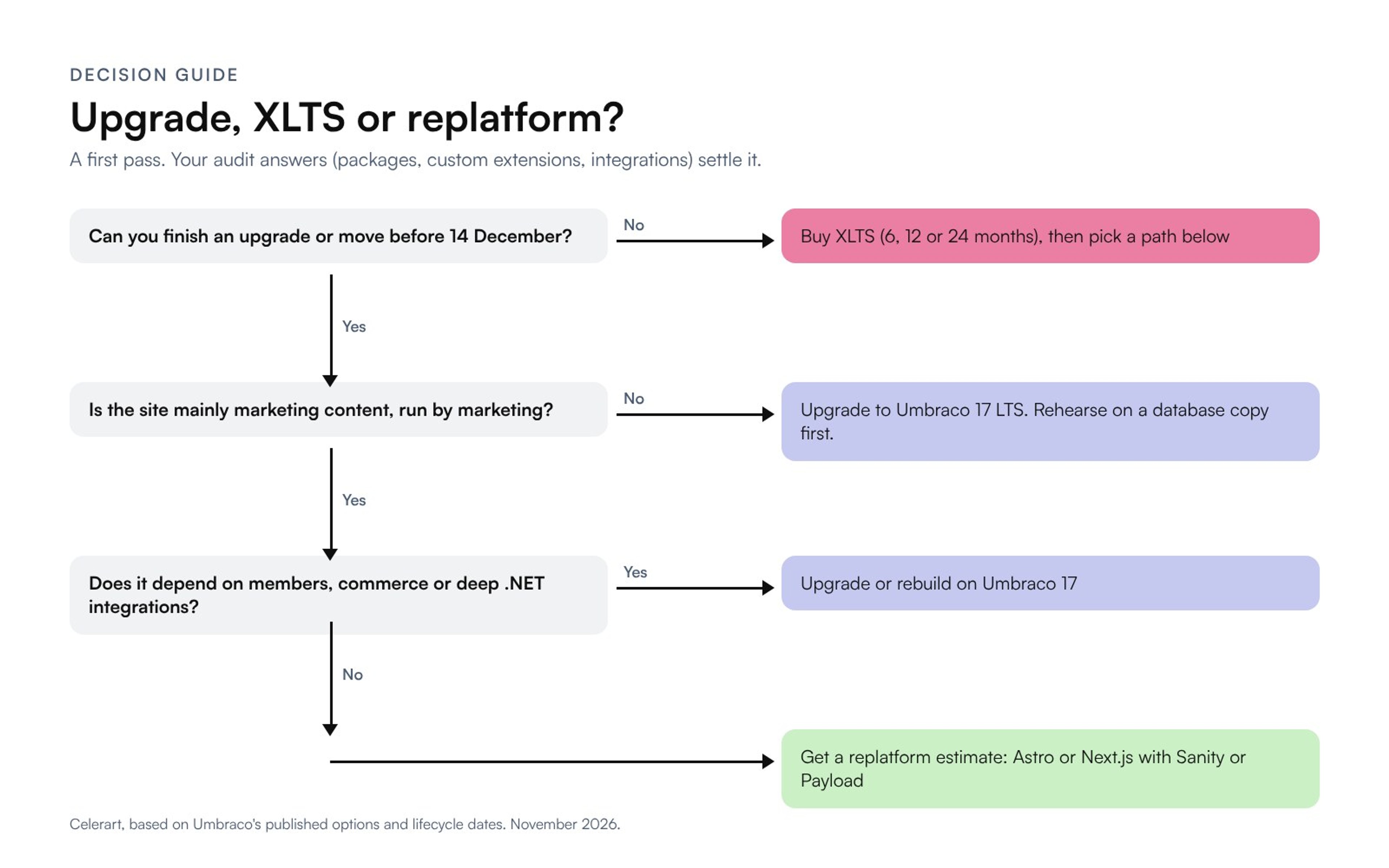
Choosing a direction doesn't need a long discovery phase. It needs answers to a short list of questions, and your developer can pull most of them from the backoffice and the codebase.
- Which exact version are you on? The backoffice shows it. Anything below 13 makes the job bigger.
- How many custom backoffice extensions do you have? Property editors, dashboards, sections, packages that add UI. Each one needs rewriting for the new backoffice if you upgrade.
- Do you still use Nested Content, the old Grid, macros or the legacy media picker? These need converting on any path.
- Which packages are installed, and do they have Umbraco 17 versions? Check each package's page or NuGet listing.
- What does the site connect to? Members, forms, CRM, search, single sign-on, payments, analytics.
- Who edits the site, and how happy are they? If editors already work around the CMS, that tells you something.
- What does hosting cost you, including someone's time to patch it?
- What does your contract or security policy say about unsupported software? That tells you whether the .NET 8 date already applies.
If the answers come back as "few extensions, current editors, .NET team, Azure", upgrade. If you hear "lots of custom backoffice code, marketing-run site, editors unhappy", get a replatform estimate before committing to an upgrade. And if it's "we can't do anything before January", buy XLTS and use the time to do one of the other two.
How do you keep your rankings if you change platforms?
As far as Google is concerned, a replatform is a site move, and site moves are where traffic gets lost. Google's site-move guidance recommends permanent server-side redirects (301 or 308), keeping them "for as long as possible, generally at least 1 year", and submitting the new sitemap in Search Console. It also warns that for a medium-sized site "it can take a few weeks or more" for Google to show the new URLs.
This is the checklist we use on every migration:
- Crawl every URL on the old site before you touch anything, including PDFs, media URLs and the redirects already configured in Umbraco.
- Export your Search Console data, so you know which pages earn traffic and must not slip.
- Map every old URL to its new address and set up a permanent redirect for each, including Umbraco's existing redirect list.
- Carry over page titles, meta descriptions, headings, image alt text and structured data, then compare old and new side by side before launch.
- Keep URLs the same wherever you can, so you need fewer redirects in the first place.
- After the DNS switch, submit the new sitemap, spot-check the top pages in URL Inspection, and watch Search Console for 404s for a few weeks.
Our website migration page has more on how we scope one.
What should the next few weeks look like?
It's mid-November, so the calendar is tight whichever way you go.
- Now: run the audit questions above and do an upgrade dry run on a copy of the database.
- Early December: decide. If you are upgrading and the dry run was clean, schedule it. If you need longer, order XLTS so coverage starts on 15 December with no gap.
- 10 December 2026: Umbraco 19, a short-term release, is due. For a site coming from 13, the target is still 17 LTS.
- 14 December 2026: Umbraco 13 end of life.
- 27 November 2027: Umbraco 17 moves to its security-only phase.
- 14 and 27 November 2028: .NET 10 support ends, then Umbraco 17 reaches end of life.
Frequently asked questions
When is Umbraco 13 end of life?
14 December 2026. Umbraco 13 was released on 14 December 2023 as an LTS version, entered its security-only phase on 14 December 2025, and stops receiving security patches on 14 December 2026.
Will my Umbraco 13 site stop working after end of life?
No. It keeps running, and editors can keep using it. What ends is security patches and official technical support from Umbraco HQ, which is why Umbraco recommends against running it after that date.
Can I upgrade directly from Umbraco 13 to 17?
Yes. Umbraco's 17.0.0 release notes say a direct LTS-to-LTS upgrade from 13 to 17 is supported, with migrations applied automatically. You still inherit every breaking change from 14, 15 and 16, so convert legacy editors on 13 first and rehearse the upgrade on a copy of your database.
What does Umbraco 13 XLTS cost?
Umbraco doesn't publish the price. XLTS for version 13 is sold in continuous blocks of 6, 12 or 24 months starting the day after end of life, with patches delivered through a private NuGet feed. You order it through Umbraco's booking form or your partner manager.
Is .NET 8 still supported?
No. Microsoft ended support for .NET 8 on 10 November 2026. Umbraco 13 is based on .NET 8; Umbraco 17 runs on .NET 10, which is supported until 14 November 2028.
Should we upgrade Umbraco or move to a headless CMS?
Upgrade if your team is invested in .NET, the site depends on Umbraco features like members or deep integrations, and a dry-run upgrade looks manageable. Consider a headless CMS such as Sanity or Payload, with Astro or Next.js, if the site is mainly marketing content, the .NET work exists mainly to keep the CMS current, and you are planning a rebuild anyway.
If you're weighing a bigger change to the site at the same time, our guide to website redesign vs rebuild vs refresh explains how to tell which job you actually need. And if you're on a different .NET CMS with the same decision ahead, we also have pages on migrating from Sitecore and Kentico.

Vad S.
Creative Director
Vad makes Celerart run, handling both account & project management.
LinkedIn ↗