Migrate from Squarespace, keep every URL
Squarespace makes a good-looking site easy, and a fast, fully tuned one hard. We rebuild yours in Astro or Next.js with Sanity or Payload: the same design or a refresh, all of your content moved, every URL kept or redirected.
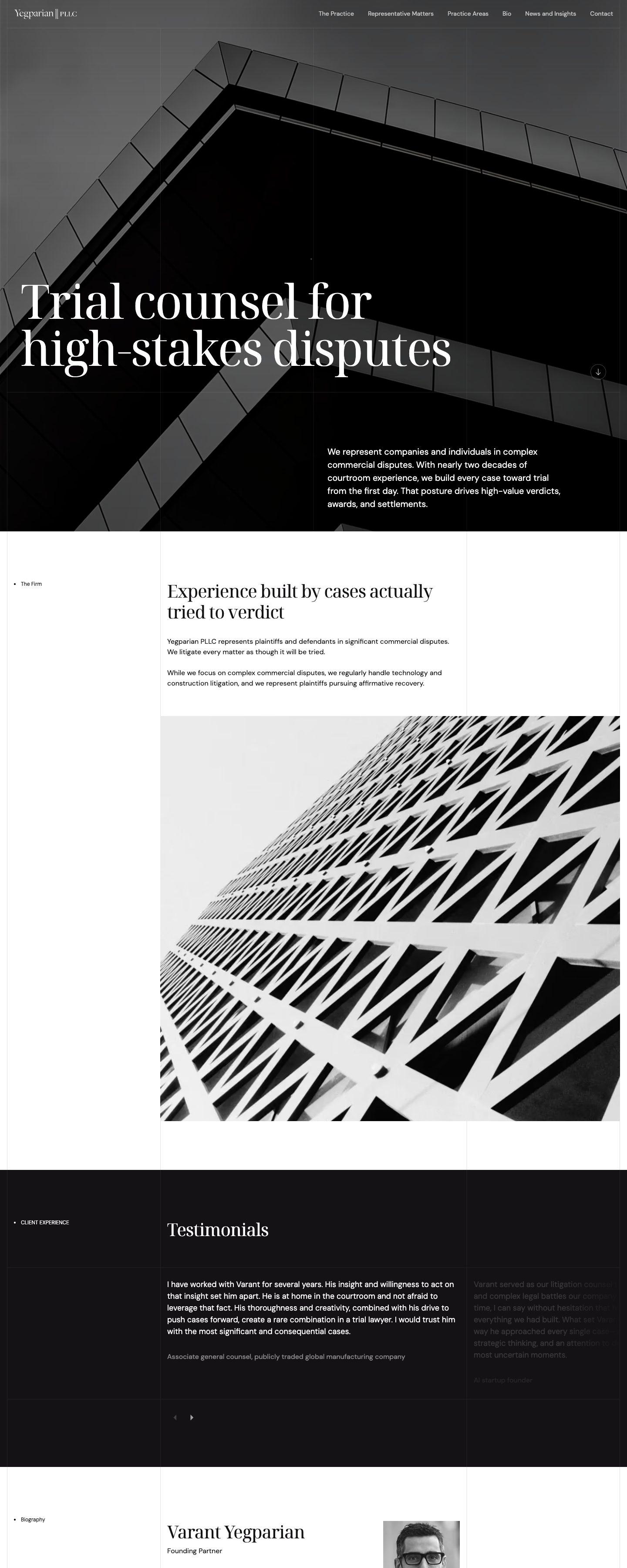 Yegparian PLLC (opens in a new tab)
Signs you have outgrown Squarespace
Squarespace is a polished place to start. These are the moments teams tell us it stopped fitting.
Slow on mobile
Templates load the scripts and styles for every block they support, whether a page uses them or not. Your Core Web Vitals pay for it, on phones most of all.
SEO stops at the basics
Canonicals are set for you, structured data is whatever the template emits, and redirects live in a plain text box. Fine-tuning means code injection.
The export leaves most of the site behind
The only export is a WordPress file with one blog and the basic pages. Products, galleries, events, folders and your custom CSS stay put.
Templates that resist custom layouts
Anything the block editor cannot do becomes custom CSS and injected scripts, which a template update can quietly break.
Add-ons with their own bills
Scheduling, member areas and email campaigns are each priced on top of the plan, and each one adds more script to the page.
What happens to your Squarespace features
Pick what your site uses today. Each feature becomes part of the site itself, moves to a service you choose, or turns out not to be needed.
- Blog collectionsPosts in Sanity or PayloadEvery blog, not just the one the export includes, moves with its categories, tags, authors and images. Rich text is converted and internal links rewritten.
- Form blocksA form built into the siteValidated on the server, filtered for spam and sent to your inbox, CRM or Slack. Automations keep working by webhook.
- Galleries and portfoliosStructured galleries in the CMSImages are re-uploaded with their captions and order, then served resized and in modern formats for each screen.
- Squarespace CommerceCommerce, scoped separatelyShops move to Shopify or another commerce platform behind the same front end.
- Member AreasAccounts in your own appLogins and gated content run in Next.js with the auth provider you choose. We scope this per project.
- Squarespace SchedulingA booking tool you chooseAcuity can stay as an embed, or move to Cal.com or another scheduling service. We scope this per project.
- Email CampaignsYour own email platformSubscribers move to Mailchimp, Resend or another tool you control, with sign-up forms built into the site.
- Custom CSS and code injectionPart of the codebaseStyling and scripts become proper components, versioned in Git and tested before every release.
- URL mappingsRedirects in the configEvery old URL is mapped to its new home in the hosting config, versioned with the code.
- Squarespace AnalyticsAnalytics with consentGoogle Analytics or a privacy-first alternative, loaded only after consent.
What changes when you leave Squarespace
Astro and Next.js decide how pages are built. Sanity and Payload are where your team edits. We recommend a pair after the audit.
| Feature | Astro + Sanity | Next.js + Payload | Squarespace |
|---|---|---|---|
| Ownership | |||
| Code you own and can host anywhere | |||
| Full export of your content | One blog and basic pages | ||
| Hosting, domain and editor on one bill | Separate services | Separate services | |
| SEO and speed | |||
| Canonicals and structured data you control | Set by the template | ||
| 301 redirects | |||
| Images resized and converted automatically | |||
| Ships only the JavaScript a page needs | Per route | ||
| Editing | |||
| Drag-and-drop visual editor | Click-to-edit preview | Live preview | |
| Designer templates ready to use | |||
| Structured, reusable content | Within collections | ||
| Custom server logic and APIs | Code injection only | ||
Sites we've already moved
Different stacks for different jobs: a law firm on Next.js and Payload, a residential launch and our own studio on Astro and Sanity.
Yegparian PLLC
WordPressNext.js + Payload
An Austin trial litigation firm. Practice areas, matters and insights are Payload collections, and every page is pre-rendered and served from the edge.
yegparianpllc.com (opens in a new tab)25 Cuba
WordPressAstro + Sanity
A new residential address in Canary Wharf. Apartments, amenities and galleries are edited in Sanity, and the site ships as static Astro pages.
25cuba.com (opens in a new tab)Celerart
WebflowAstro + Sanity
Our own studio site. Every one of the 164 old URLs was carried over or redirected, and all content is now edited in Sanity.
celerart.com (opens in a new tab)


How we move a Squarespace site
Your Squarespace site stays live until the new one is ready. The switch is a DNS change, not a weekend of downtime.
Audit
Audit
We crawl every URL, list every collection, block, form and add-on, and export your rankings, so nothing is lost by accident.
Content model
Content model
Pages, blogs, galleries, events and products become a clean schema in Sanity or Payload, shaped around how your team actually edits.
Content import
Content import
The Squarespace export covers the primary blog and basic pages. A crawl of the live site fills the gaps, and images are downloaded and re-uploaded in a separate pass.
Front end
Front end
We rebuild the design in Astro or Next.js: the same look, or a refresh if one is due. Every template is checked against the old one.
Redirects and launch
Redirects and launch
Every old URL gets a permanent redirect to its new address. Metadata, sitemaps and structured data are compared before the DNS switch.
Handover
Handover
Your team gets a walkthrough of the new editor. Then the Squarespace plan and its add-ons can be cancelled.



Questions about leaving Squarespace
Not if the move is planned. Every URL keeps its address or gets a permanent one-hop redirect, and titles, descriptions, social images and structured data are carried over and checked before launch.
The export gives us one blog and the basic pages. Products, galleries, events, extra blogs and index pages are taken from a crawl of the live site, and images are moved in their own pass. Everything is checked against the old site before launch.
Usually, yes. Pages are built ahead of time, ship only the scripts they use and serve images at the right size for each screen. We measure Core Web Vitals on the old and new site before launch, so you can compare.
Yes. We rebuild the design component by component and check every template against the live site. If the design is due a refresh, the migration is a good moment for it.
Yes. Editors build pages from approved blocks with live preview, and in Sanity they can click any text on the preview to edit it. What they lose is dragging blocks anywhere on the page, which is usually what pulls pages off brand.
We scope them one by one. Usually a dedicated service such as Shopify, an auth provider or a scheduling tool takes over, connected to the new front end. The audit tells you what moves where.
It depends on the number of pages, collections and add-ons. After the audit you get a fixed scope and timeline, and the Squarespace site stays live until launch day.